New Phoenix Connect Features:
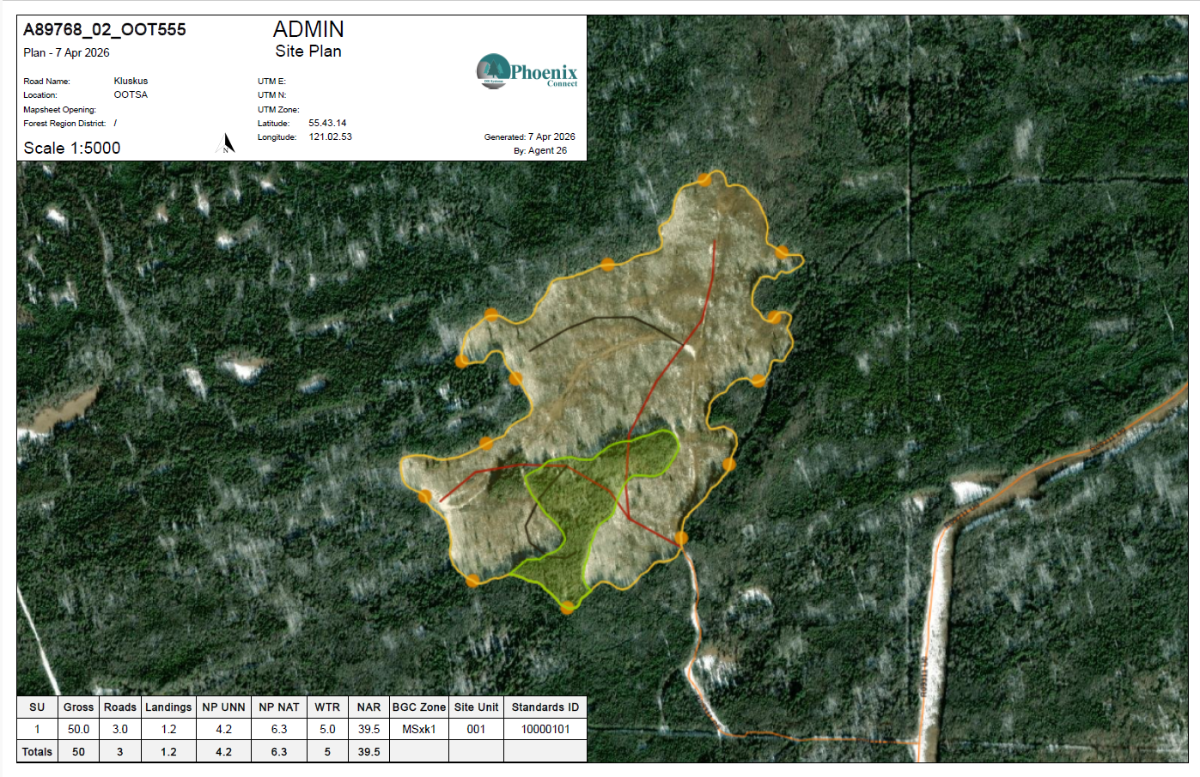
Site Plan Map Template
Teams can now generate Site Plan PDFs directly within Phoenix Connect using existing operational and spatial data.
For companies using Spatial Sync with ArcGIS Online, ArcGIS Online layers can be viewed directly within the Map Tab and included in generated Site Plan Maps.
Benefits:
- View ArcGIS Online layers directly within Phoenix Connect
- Generate Site Plan PDFs tied to activity records
- Keep mapping and operational workflows in one place
This feature was built with operational flexibility and client feedback in mind. If your workflow requires additional functionality, we'd love to hear from you.
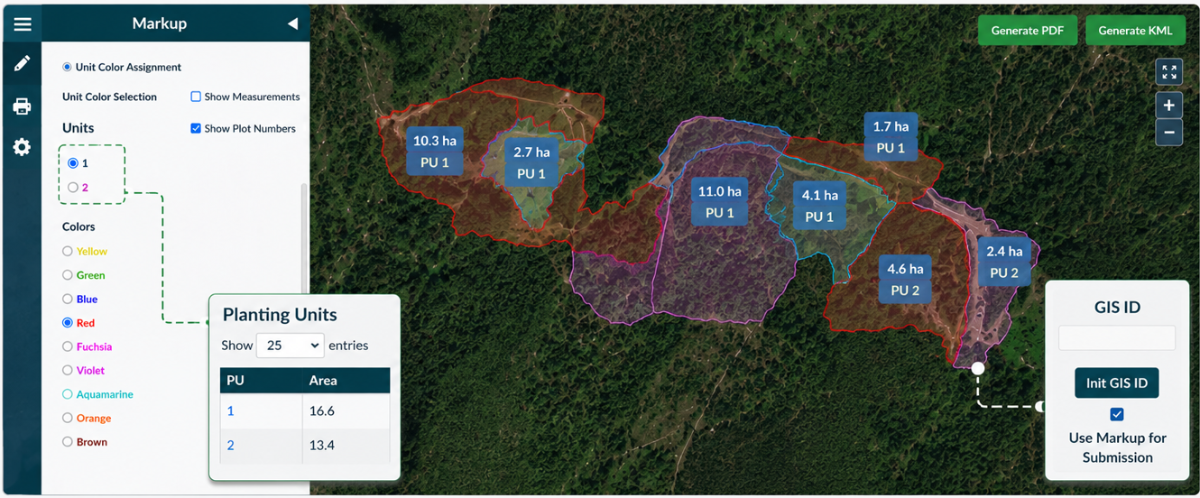
Markup Shapes for XML Submissions
Do you have field crew GPS tracks that need to be used for a RESULTS activity submission?
Teams can now use markup shapes for XML submissions, helping prepare spatial data faster when GIS resources are limited or turnaround time is tight.
Ideal For
- Quick operational updates
- Field-generated spatial data
- Smaller projects or touch-up activities
- Reducing bottlenecks between field and office teams
Click HERE to learn more about using activity mark-up spatial for XML submissions
Contact us if there are additional/new uses for these tools!

Use Case: Engagement Tracking & FOM Management
Managing engagement records across multiple openings can quickly become difficult when updates are spread across emails, spreadsheets, notebooks, and team members.
Using the Engagement module, teams can keep communication, concerns, follow-ups, and operational context connected within one centralized workflow.
How the Workflow Connects
-
A communication or concern is received from a stakeholder or interested party
-
The discussion is logged directly within Phoenix Connect
-
Follow-up actions or internal tasks are assigned to team members
-
Records remain tied to the related opening, road, or operational area
-
Information can later be referenced during planning, coordination, or preparing FOM submissions
Benefits:
- Improve visibility across departments
- Reduce duplication and scattered records
- Keep communication history tied to areas of interest
- Support accountability and follow-up tracking
- Simplify organization of information required for FOM submissions
- Create FOM Submissions
- Build relationships and engagement with your community
Already Included: The Engagement module is part of the standard Phoenix Connect subscription, meaning current clients already have access.
Want to see how your team could use these workflows? Contact us for a walkthrough.
Tip of the Season: Pre-Harvest Tracking
While Phoenix Connect is widely used for silviculture operations and government reporting, it can also support pre-harvest planning and tracking.
Teams can import and store Cruise data alongside operational tracking and mapping activities, helping improve visibility from planning through to operational execution.
Teams Can:
- Manage CP/block development and associated operational activities
- Track volume by species and season
- Monitor piece size trends
- Track volume status (Cruise, Recce, VRI)
- Generate and manage Notice of Commencement (NOC) information
- Keep pre-harvest and operational information connected in one system
For companies already using Phoenix Connect for silviculture and reporting, incorporating pre-harvest tracking can help improve coordination between planning and operations teams.

Industry Update: 2026 Silviculture Survey Manual Changes & CEDRSS Reporting
The 2026 Silviculture Survey Procedures Manual introduced several important updates ahead of field season, including the new CEDRSS Implementation Guide for reporting Complex Ecosystem Dynamic Retention Silviculture Systems (CEDRSS).
Additional Updates Include:
- Root disease netdown (FS660) updates now applying to all free-growing damage criteria tables
- New training videos and accreditation preparation resources
- Expanded aerial assessment guidance and suitability matrices
- Additional commercial thinning procedures and alternative survey methods
CEDRSS Reporting:
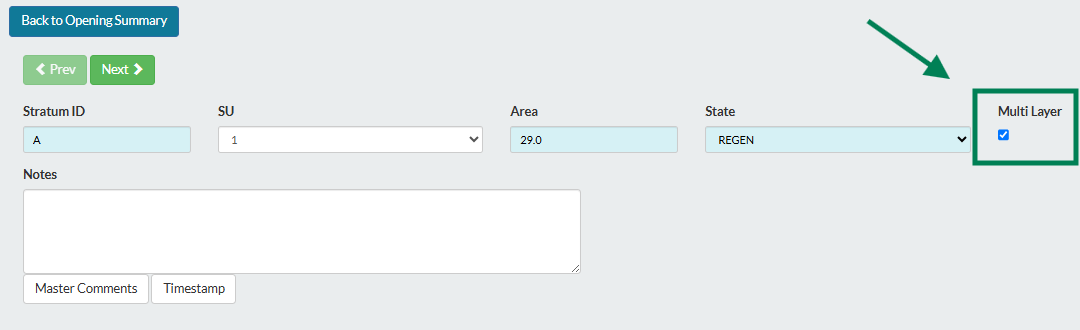
While CEDRSS introduces a new multi-layer survey workflow, it can still be effectively tracked and reported within Phoenix Connect.
Current Reporting Guidance:
- Overstory is reported in L1 - Mature
- Understory is reported in the most abundant of L2, L3, or L4
- Remaining layers may remain blank without negatively impacting RESULTS reporting
Key Reporting Notes:
- Report mature overstory inventory information in Layer 1
- Report combined understory inventory information in the most abundant of L2, L3, or L4
- Enter total basal area, including crop and non-crop stems, in Layer 1
- Total density is not required in Layer 1 when stocking status is MAT (Mature)
- Layer 1 species composition is based on basal area, while understory composition is based on density
- Include a note in the RESULTS declaration comments indicating the standards unit uses CEDRSS

Helpful Resources:
2026 Silviculture Updates Summary
CEDRSS Implementation Guide
2026 Silviculture Survey Procedures Manual

Contact Us
#11 - 321 Wesley Street
Nanaimo, BC, Canada, V9R 2T5
x 250-591-4433 A info@drsystemsinc.com
